
Absence Forecasting for Small Teams: See Your Busiest Weeks Coming
How absence forecasting uses your own leave history to flag the weeks you'll be short-staffed, check each department's cover over the next 30, 60 or 90 days, and plan before it hurts.
Every team has weeks that catch it out. The February school break, the bridge days around a public holiday, the last fortnight of December. You know they're coming, roughly, but the requests arrive one at a time, and by the time you see the whole picture three people from the same team are booked off together.
Absence forecasting turns your own leave history into a heads-up. It doesn't guess from industry averages: it looks at when your team actually took time off, and shows you when that's likely to happen again. Absenca includes it on Pro, under Forecasts.
Hot weeks: the pattern in your history
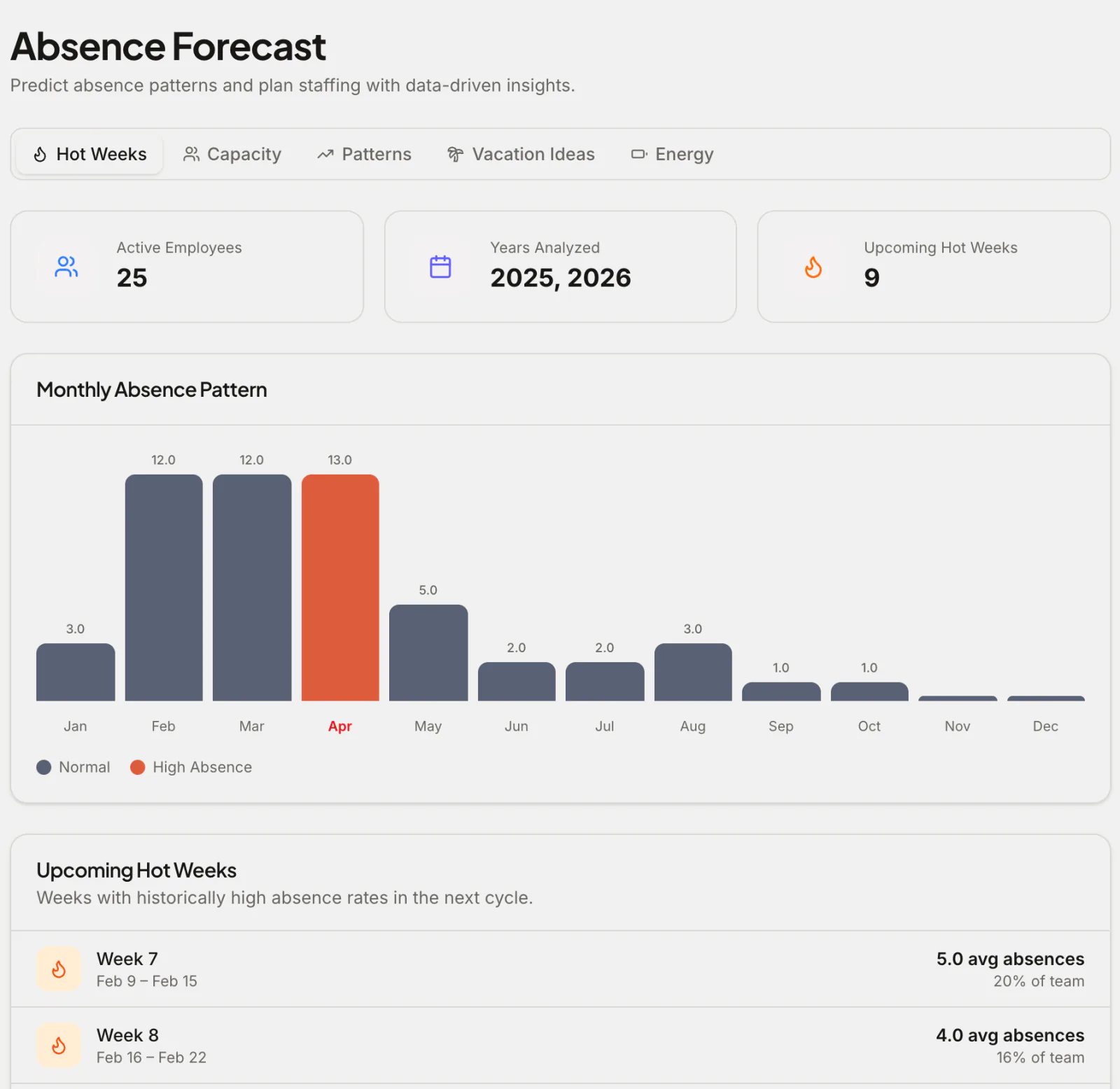
The first tab looks back over last year and this year so far and finds the weeks with the highest absence rates.
The monthly chart shows the shape of your year at a glance (here, a team that takes most of its leave in February to April). Below it, Upcoming hot weeks lists the specific weeks in the next cycle that were busiest before, with the average number of people out and the share of the team.
That list is your planning calendar. If week 7 had a fifth of the team out last year, it's worth asking now who's planning to be away, before the requests pile up.
Capacity: who's covering each department
The Capacity tab looks forward, department by department, over the next 30, 60 or 90 days. For each working day it adds up:
- Leave that's already approved
- Leave that's likely based on your seasonal pattern
and compares it with the department's maximum simultaneous absences, the limit you set on how many people from a team can be off at once. Days where the department is likely to go over are counted as risk days, so you can see at a glance which team is heading for a thin week.
If you haven't set a maximum for your departments yet, it's worth doing: it's also the rule Absenca uses to stop a request that would leave a team uncovered.
Patterns: individual tendencies
Patterns looks at each person's history, up to three years, to show their usual timing: which months they tend to take leave in, and how. It helps you anticipate, not police: it's the difference between asking someone in May "are you planning your usual August break?" and finding out in July.
Private leave types, such as sick leave set to private, are left out of patterns entirely.
Vacation ideas: the other side of the forecast
Forecasting isn't only about protecting cover. The Vacation Ideas tab finds the most efficient ways to take leave around your office's public holidays: where one or two leave days turn a holiday into a long break.
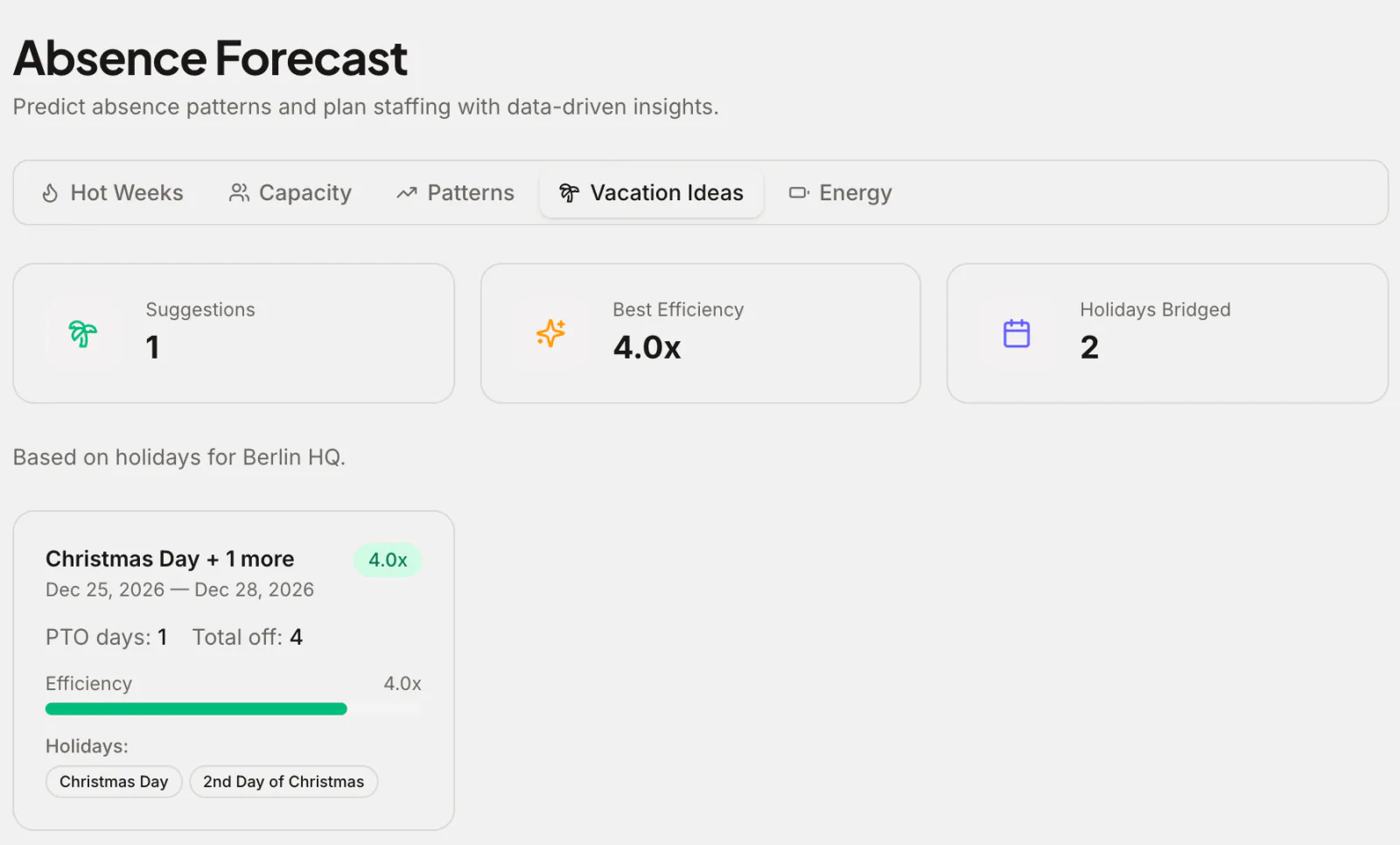
Sharing these early does two things. People get more rest for fewer days, and the requests arrive months ahead instead of the week before, which is exactly what makes cover easy to plan. (There's more on this in how to maximise annual leave with bridge days.)
How to use the forecast in practice
A light routine works best:
- Once a quarter, open Hot Weeks and note the busy weeks coming up.
- Tell the team early. "The week of 9 February is always busy, so please get requests in by the end of December" prevents most clashes.
- Check Capacity monthly for the next 60 days, and act on any department in the red: stagger requests, arrange cover, or move a deadline.
- Pair it with blackout periods only where you genuinely can't spare people, such as a launch or a year-end close.
What it needs to be useful
Forecasts are only as good as the history behind them. A few months of leave data gives you a rough picture; a full year makes the seasonal pattern reliable. If you're moving from a spreadsheet or another tool, importing past leave gets you there on day one. Pro includes a wizard for importing from Vacation Tracker.
Frequently asked questions
Which plan includes absence forecasting? Pro ($37.50 a month for up to 50 people) and the Custom Pack.
Who can see the forecast? Admins and location-admins. It's scoped to the office you have selected.
Does it predict sick leave? It includes the seasonal pattern of all non-private leave, but it can't predict an individual illness. Treat it as a planning aid, not a prediction about any one person.