
The leave side of your HR stack
Absence and leave management software for small teams
Absence and leave management that does one thing brilliantly — so the time-off part of HR isn't a spreadsheet bolted onto everything else.
Free for up to 10 people · 11 to 50 people: $37.50 a month on Pro
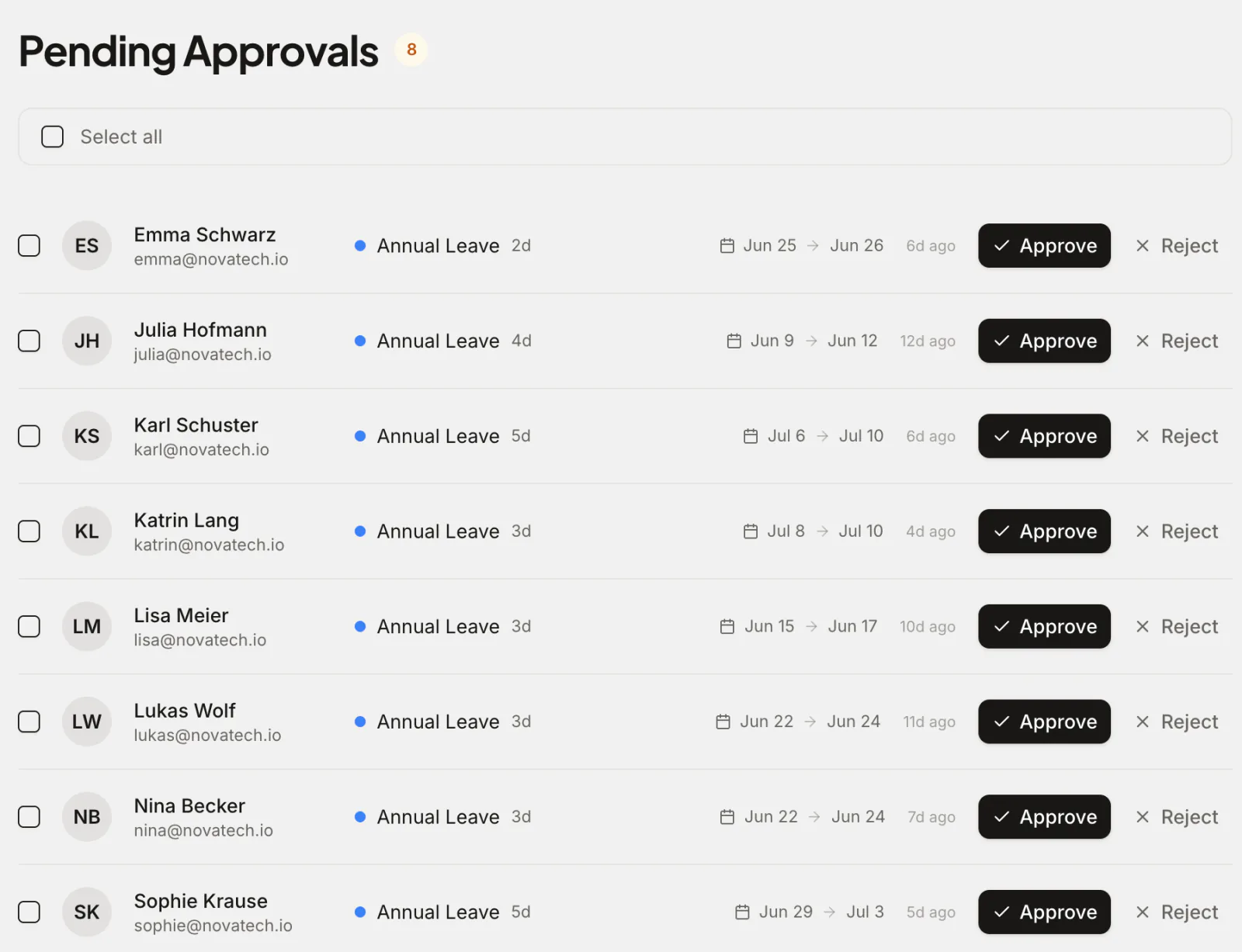
Absence management software handles planned leave and unplanned absence — requests, approvals, balances, accruals, sick days and public holidays — in one place instead of a spreadsheet. Absenca focuses on exactly that — and nothing it doesn't need to — so it's quick to set up, easy to use, and accurate by default.
It isn't a full HR suite with payroll and applicant tracking, and that's the point: it's the dedicated leave and absence layer that does the job better than a general HR tool's afterthought module, and works happily alongside whatever HRIS you already have.
What you get
Leave calendar & approvals
A shared team calendar and one-click approvals from the web, or from Slack on Pro.
Policies, accruals & carry-over
Per-office leave years, accrual rules, carry-over caps, seniority entitlements and blackout periods — applied automatically.
Absence analytics
Bradford Factor scoring, utilisation and trends, with CSV export and scheduled reports — not just a calendar.
Integrations & holidays
A Slack bot, Google and Outlook calendar sync, plus public holidays for 190+ countries per office.
Planned leave and unplanned absence, one system
Absence management software covers both kinds of time away: the leave people plan and the absence nobody planned. Most spreadsheets track the first and lose the second. Absenca keeps both on the same calendar and the same balances (see what absence management means).
| Planned leave | Unplanned absence | |
|---|---|---|
| Examples | Holidays, parental leave, unpaid leave | Sick days, emergencies, short-notice appointments |
| How it's booked | Requested ahead and approved | Logged on the day or afterwards |
| What it affects | Balances and cover planning | Cover, sick-pay records and patterns |
| What Absenca adds | A wallchart of who else is off, blackout periods, department limits | Doctor's notes, private leave types, Bradford Factor scores |
Leave calendar and approvals
Every request lands on one shared calendar and goes to the right approver, with a backup approver and reminders so none stalls (see how leave approvals work). The wallchart shows who else is off on the same dates, and a department can set the most people allowed off at once, so a request that would exceed it is refused when it's submitted. Blackout periods block dates you can't spare people.
Policies, accruals and carry-over
Each office has its own leave year, leave types and policies. Allowances can accrue over the year, grow with seniority and roll over up to a cap; see carry-over rules and TOIL tracking for the details.
Absence analytics: Bradford Factor and reports
Reports show who took what, by leave type, department and month, and export to CSV, XLSX or PDF. Bradford Factor scoring, on Pro and the Custom Pack, not on the free Starter plan, ranks frequent short absences above occasional long ones, so patterns surface before they become a problem.
How one sick day moves through Absenca
Greta Vogel wakes up ill on a Tuesday. She logs a sick day for today from her phone in the web app. NovaTech's sick leave type needs no approval, so the request is approved straight away and she gets a confirmation.
Her sick-day count goes up by one, Absenca's calendar shows her as away (the leave type is private, so colleagues there don't see why), and her Bradford Factor score updates. At the end of the month, the admin exports the leave report as a CSV for payroll. Nobody typed anything twice.
Dedicated tool or HR-suite module?
General HR platforms try to do everything — payroll, onboarding, performance — and leave is usually a basic add-on. Absenca does leave and absence properly: the policies, accruals and edge cases that those add-ons fumble, handled correctly and visibly. That focus is why a small team can be up and running in an afternoon, without an implementation project.
Already using a broader HR system? Absenca complements it. Use it as the leave and absence tracker your managers actually open, export data when you need it, and keep your HRIS for the rest. To compare the options, compare the best leave management software.
Pricing
Absenca is free for up to 10 people. Pro is $37.50 a month for up to 50 people, or $33.75 a month billed annually ($405 a year). There are no per-module add-ons and no setup fee. See what it costs against other tools.
How small-team absence tools compare
Most leave tools for small teams charge per user per month, and a free plan is the exception. Here is what five of them offer, each linked to the page we checked it on. Leave management software pricing compares more tools and what teams of 10 to 50 people pay each month.
| Tool | Free plan | Price |
|---|---|---|
| Absenca | Up to 10 people, with no time limit | $37.50 a month for up to 50 people |
| Timetastic | None; a 30-day trial1 | $1.50 or $2.50 a user a month1 |
| Vacation Tracker | None; a 14-day trial2 | $2 or $4 a user a month, with a $50 or $100 minimum3 |
| Leaveboard | Up to 9 employees4 | $1.35 an employee a month from the 10th5 |
| Day Off | Up to 10 users6 | $2 a seat a month, $20 minimum6 |
Why teams choose Absenca
- Focused leave and absence management, done well
- Accruals, carry-over, seniority and blackout periods
- Bradford Factor analytics and scheduled reports
- Slack and calendar integrations + global holidays
- Free for up to 10 people; Pro is $37.50 a month for up to 50 people
Frequently asked questions
- What is leave management software?
- Leave management software records and manages employee absences — requests, approvals, balances, accruals and public holidays — so time off is tracked accurately and managers have visibility, replacing spreadsheets and email threads.
- Does it handle sick leave?
- Yes. Sick leave is its own leave type: employees can log it on the day or afterwards, attach a doctor's note, and book half days or hours. Mark it private and colleagues see only "Away" in Absenca's calendar and team views. Channel digests, calendar feeds, shared team calendars, reports and out-of-office replies still show the type for now.
- Is Absenca HR software?
- Absenca is dedicated leave and absence management software — the time-off part of HR — rather than a full HRIS with payroll and recruiting. It does that one job thoroughly and works alongside any HR system you already use.
- Does it replace my HRIS like BambooHR?
- It replaces the leave-tracking part. Many teams run Absenca for absence management and keep a broader HR tool (or nothing) for the rest — it's designed to complement, not duplicate, a full HRIS.
- How much does it cost?
- Absenca is free for up to 10 people. Pro is $37.50 a month for up to 50 people, or $33.75 a month billed annually ($405 a year).
Sources
- timetastic.co.uk/pricing, checked
- vacationtracker.io/knowledge-base/guide-what-are-the-differences-between-our-core-complete-plans, checked
- vacationtracker.io/knowledge-base/how-can-i-change-my-subscription-corecomplete-and-annualmonthly, checked
- leaveboard.com/support/billing-and-subscription, checked
- leaveboard.com/pricing, checked
- day-off.app/pricing, checked