
Plan staff holidays at a glance
A staff holiday planner the whole team can see
Plan annual leave on a shared wallchart, stop clashes before anyone books, and keep each nation's bank holidays out of everyone's allowance.
Free for up to 10 people · 11 to 50 people: $37.50 a month on Pro
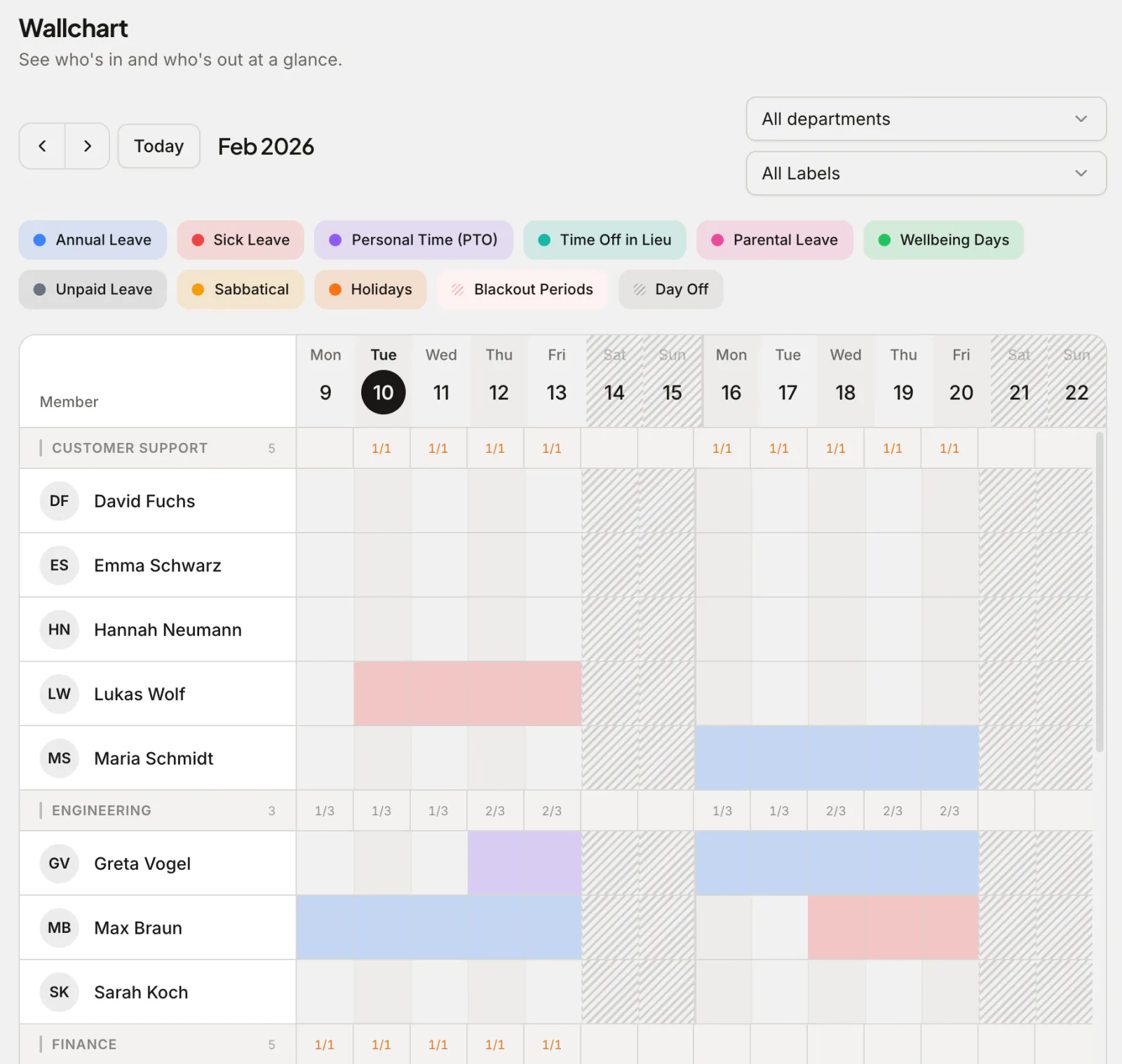
A staff holiday planner answers the question every manager asks before approving leave: who else is off that week? Absenca shows the whole team on a single wallchart, so you can see coverage at a glance, and an optional cap per department refuses a booking that would leave a team short.
Employees request holiday in a couple of taps and see their remaining allowance before they submit. Each office keeps its own bank holiday calendar, so a team in Glasgow and a team in Belfast are each counted against their own days off.
What you get
Team wallchart
A grid of who's off across several weeks, a row per person, grouped by department, so coverage gaps are obvious before you approve.
Absence limits
An optional limit per department refuses a request that would put too many people off on the same days.
Bank holidays per office
Load your country's public holidays (190+ countries), keep the ones your office gets and add your nation's own, so holiday is counted correctly.
Simple approvals
Requests go to the person's manager and are approved or declined in one click, with everyone's view kept in sync.
See who's off before you book
The wallchart is the heart of a good staff holiday planner: a single grid showing every booked and pending day off across the team. Managers approve knowing exactly who's covering, and employees can pick dates that don't clash with colleagues.
Pending requests sit on the same grid as approved ones, so a manager deciding on one request sees the others waiting for the same days. Filter by department when the whole company is too much to read at once.
Holiday planner template vs app
Plenty of teams start with a spreadsheet: one row per person, one column per day, and a colour for each kind of leave. If that's you, our free Excel leave tracker template and Google Sheets template are a fair place to begin, with no sign-up. A template works while one person keeps it, the team is small, and everyone is in the same nation.
It stops working in predictable places. Nothing stops two people booking the same week; you find out when you look. Bank holidays are typed in each year, usually for one nation. Balances are worked out by hand, and the file someone has open is never quite the latest one. Here is what changes when the plan lives in an app:
| Job | Spreadsheet template | Absenca |
|---|---|---|
| Spotting a clash | Someone reads across the rows | The department cap refuses the booking when it's made |
| Bank holidays | Typed in each year, for one nation | Kept per office, so each team gets its own |
| Remaining allowance | A formula someone has to maintain | Updated the moment a request is approved |
| Asking for time off | An email or a chat message, then a copy into the sheet | A request the manager approves in one click |
| Who changed what | Whoever saved last | Every request and decision recorded with who made it |
UK bank holidays by nation
The UK has no single bank holiday calendar. England and Wales share one, Scotland and Northern Ireland each have their own, and the summer bank holiday falls on a different Monday in Scotland. These are the 2026 bank holidays as GOV.UK lists them:
- England and Wales (8 days): New Year's Day (1 January), Good Friday (3 April), Easter Monday (6 April), the early May bank holiday (4 May), the spring bank holiday (25 May), the summer bank holiday (31 August), Christmas Day (25 December) and Boxing Day, moved to Monday 28 December.
- Scotland (10 days): New Year's Day, 2 January, Good Friday, 4 May, 25 May, a one-off World Cup bank holiday on 15 June, the summer bank holiday on 3 August, St Andrew's Day (30 November), Christmas Day and 28 December. Easter Monday is not a bank holiday in Scotland.
- Northern Ireland (10 days): the England and Wales list plus St Patrick's Day (17 March) and the Battle of the Boyne, moved to Monday 13 July.
Bank holidays aren't an extra legal right on top of holiday: the 5.6 weeks of statutory leave can include them, and your contracts say whether they do. What matters for a planner is that a bank holiday your office closes for is never deducted from someone's allowance, and that a Scottish office isn't closed on the English days.
In Absenca each office has its own calendar. Pick the United Kingdom and Absenca lists the UK's shared bank holidays. You keep the ones your office closes for (a Scottish office drops Easter Monday), then add your nation's own days by hand. Every office adds its summer bank holiday (31 August in England, Wales and Northern Ireland, 3 August in Scotland); a Scottish office also adds 2 January and St Andrew's Day (and, in 2026, 15 June), and a Northern Irish one St Patrick's Day and the Battle of the Boyne. Do it once per office and each year after. Every country's calendar is on our public holiday pages.
A worked clash: the department cap in practice
NovaTech's customer support desk in Edinburgh has six people, and someone has to answer the phones every day. The office admin sets the department's limit to 2: no more than two of the six can be away on the same day.
Two colleagues already have approved leave from Monday 3 to Friday 7 August, the week that starts with Scotland's summer bank holiday. Greta Vogel asks for Wednesday 5 to Wednesday 12 August. On 5, 6 and 7 August two people are already off, and a third would break the limit, so Absenca refuses the request when she submits it and tells her why: at most 2 people can be away at once, and 2 approved absences already overlap her dates.
Greta looks at the wallchart, sees the week after is clear, and books Monday 10 to Friday 14 August instead. One request, no email thread and no manager having to say no. Only approved leave counts towards the limit, so requests still waiting for a decision don't block each other, and the manager sees the team's coverage on the wallchart before approving either.
What it costs at 8, 15 and 30 staff
Absenca is free for up to 10 people, with no trial clock. From 11 people Pro is one flat price for up to 50, whatever the headcount in between, so the per-person cost falls as you hire:
| Team | Each month | Per person |
|---|---|---|
| 8 staff | free on Starter | Nothing |
| 15 staff | $37.50 a month on Pro | $2.50 |
| 30 staff | $37.50 a month on Pro | $1.25 |
What the free plan covers, and what needs Pro
A team of 8 gets the wallchart, requests and approvals, the department cap and bank holidays per office at no cost, on 1 office with 2 leave types. Pro raises that to 2 offices and 20 leave types, and the Slack bot is on Pro and the Custom Pack, not on the free Starter plan. Billed yearly, Pro is $405 a year. See every limit on the pricing page.
Last reviewed: · Absenca Team
Why teams choose Absenca
- Shared wallchart of who's off, by team or office
- Max-people-away limits per department
- Bank holidays per office, for each UK nation
- One-click approvals, kept in sync for everyone
- Free for up to 10 people; Pro is $37.50 a month for up to 50 people
Frequently asked questions
- What is a staff holiday planner?
- A staff holiday planner is a shared tool for booking and viewing employee annual leave, usually as a calendar or wallchart, so teams can see who's off, avoid clashes and keep balances accurate.
- Does it show bank holidays for Scotland and Northern Ireland?
- Yes. Each office has its own holiday calendar: load the UK's public holidays, keep the ones your office closes for and add your nation's own, including the summer bank holiday, which every office adds by hand. A bank holiday on an office's calendar is never deducted from anyone's allowance.
- Can it stop too many people booking the same week?
- Yes. Set a maximum number of people allowed off at once per department, and a request that would exceed it, counting approved leave, is refused when it's submitted.
- Is there a free staff holiday planner template?
- Yes. Our Excel and Google Sheets templates are free with no sign-up. When you want clash limits, automatic balances and approvals, Absenca is free for up to 10 people.
- Is there a free staff holiday planner app?
- Yes. Absenca is free for up to 10 people; larger teams use Pro, at $37.50 a month for up to 50 people.