
Bradford Factor Reporting in Practice: Automatic Scores, Used Fairly
How to track the Bradford Factor automatically from your leave data, which absences should count, how spells are grouped, and how to use the scores fairly instead of as an automatic trigger.
The Bradford Factor is a simple idea: frequent short absences disrupt a team more than one long one, so they should weigh more. The formula is S² × D, the number of separate absence spells squared, times the total days absent.
Two people with ten sick days each can score very differently. Someone off for one ten-day stretch scores 1² × 10 = 10. Someone off for ten separate single days scores 10² × 10 = 1,000.
Working that out by hand from a spreadsheet is tedious and easy to get wrong. This post covers how Absenca calculates it automatically on Pro, and, just as important, how to use the number without turning it into a blunt instrument. (To try the maths on a single person, the Bradford Factor calculator does it in your browser.)
What counts as an absence
Not every day off should count. Annual leave, parental leave and a pre-booked medical appointment aren't the unplanned absences the Bradford Factor is meant to measure.
In Absenca you choose which leave types count, with a Counts for Bradford Factor switch on each leave type. Typically that's sick leave and any "unplanned absence" type, and nothing else. Change the setting and the scores recalculate from the same records.
How spells are grouped
A "spell" is one continuous absence. Absenca treats absences that touch, or are at most one day apart, as the same spell. So someone who's off Monday and Tuesday, back Wednesday and off again Thursday is counted as one spell, not two, because a single day back in the middle usually means the same illness.
Scores cover one calendar year at a time, and you can switch years in the report.
Where to find it
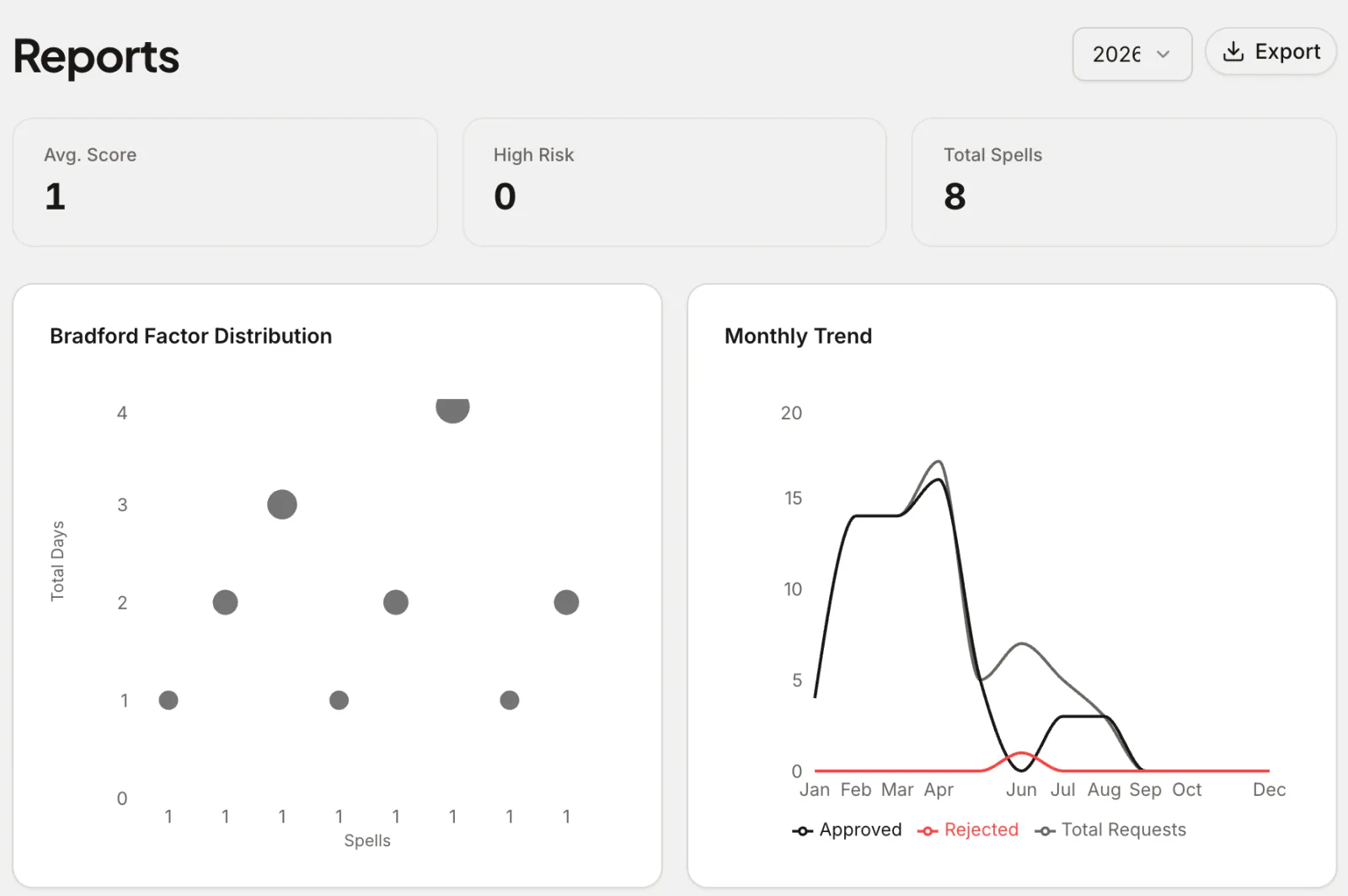
The Bradford Factor is a tab in Reports, for admins and location-admins. It shows:
- The average score and how many people are high-risk
- A distribution chart of spells against total days, so outliers stand out
- A table per person with spells, days, score and a risk band
The bands are low (below 50), medium (50 and above), high (200 and above) and critical (500 and above). You can export the table as CSV, Excel or PDF.
Use it as a prompt, not a verdict
The report itself says it plainly:
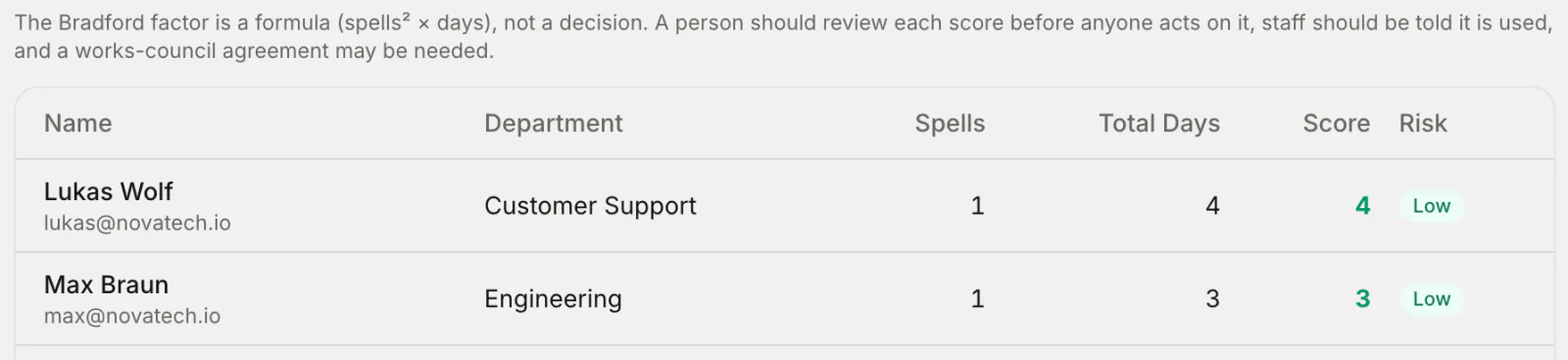
A high score is a reason to have a conversation, not a reason to start a process. A few rules keep it fair:
- Look at the person, not just the number. A chronic condition, a disability, a run of childcare emergencies or a bereavement can all produce a high score. In many countries, treating disability-related absence the same as other absence is unlawful.
- Tell your team you use it. People should know the Bradford Factor exists in your absence policy and what happens at each band. Surprising someone with a score breaks trust fast.
- Agree it where you need to. In some countries, Germany among them, using absence scores for monitoring needs a works-council agreement. Check before you switch it on.
- Use it with return-to-work conversations, not instead of them. The absence management guide covers how those conversations work.
- Watch the trend, not the snapshot. One bad winter isn't a pattern. Compare years before drawing conclusions.
What it's good at
Used well, the Bradford Factor helps you notice things you'd otherwise miss:
- Someone whose short absences are becoming more frequent, who might need support or an adjustment
- A department with a cluster of high scores, which often points at workload or management, not individuals
- Whether a change you made (flexible hours, a new manager, a wellbeing day) actually reduced short-term absence
It pairs naturally with the advice in how to reduce absenteeism at work: find the pattern, then fix the cause.
Frequently asked questions
Which plan includes Bradford Factor reporting? Pro ($37.50 a month for up to 50 people) and the Custom Pack. The online calculator is open to anyone.
Can managers see Bradford scores? Only admins and location-admins can see the report. Scores involve health-related absence, so access is deliberately narrow. A quick legal note: rules on monitoring absence, health data and disability vary by country. This is general guidance, not legal advice; check the rules where you operate.