
Managing Leave Across Two Offices: Holidays, Work Weeks and Rules That Differ
Opening a second office changes leave more than people expect: different public holidays, work weeks, leave years and rules. Here's how to run both cleanly from one leave system.
The first office sets the rules without anyone noticing. Monday to Friday, the local public holidays, a leave year that starts in January, 25 days of annual leave. Then you open a second office (a sales team in another country, a small engineering hub in another city) and every one of those defaults turns out to be local.
Treat the new office as a copy of the old one and you'll get it wrong in quiet, expensive ways: a public holiday deducted from someone's allowance, a leave year that resets on the wrong month, a carry-over rule that's unlawful where they work.
What actually differs between offices
When you list it out, the second office usually differs on most of these:
- Public holidays. Not just which days, but how many. A German office and a Swiss office have different holiday calendars, and they differ again by region.
- Work week. Some offices work Sunday to Thursday, some run four-day weeks, some have half-days on Fridays.
- Time zone and working hours, which matter as soon as you track leave in hours.
- Leave year. Many countries run leave on the calendar year; others start in April, or on each person's start date. We wrote about choosing in when should your leave year start.
- Statutory minimums and carry-over rules, including when carried-over days expire.
- Leave types. Some leave exists by law in one country and not the other.
- Blackout periods, like a year-end close that only affects one office.
How Absenca handles it: each office is its own unit
In Absenca, every office location carries its own settings: work days, time zone, country, working hours, leave year start, carry-over expiry, leave types, leave policies, labels, blackout periods and public holidays. Departments belong to an office, and each person belongs to an office.
So a request from someone in Zurich is counted against Zurich's work week and Zurich's holidays, and approved under Zurich's rules, even if their manager sits in Berlin.
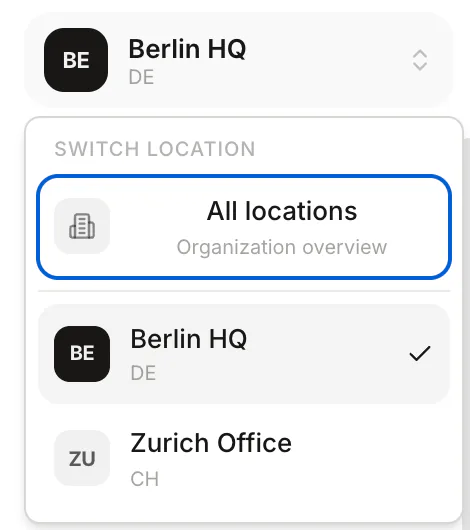
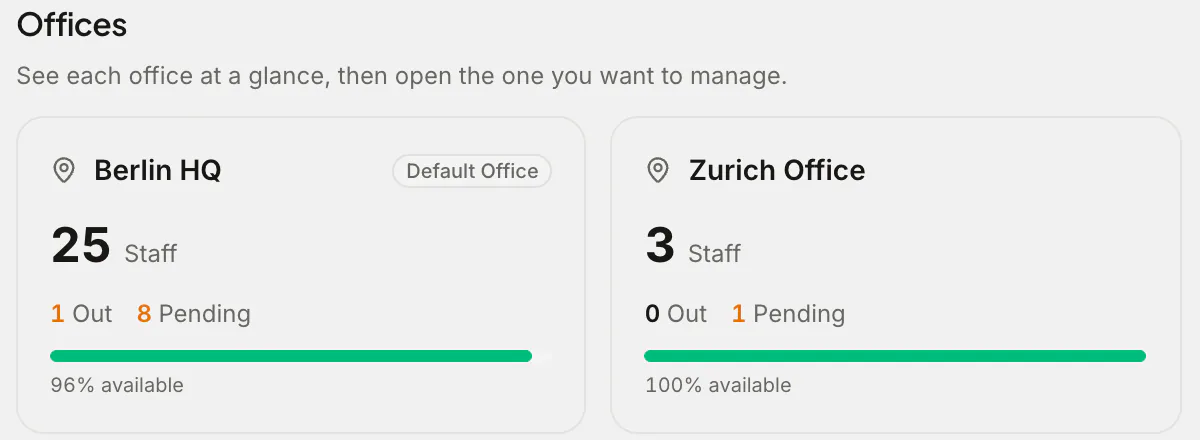
The office switcher at the top of the sidebar moves between offices, and All locations gives you the organisation overview: staff, who's out and pending approvals for every office side by side.
Who manages what
As a company grows across sites, it helps to delegate. Alongside admins (who see everything), Absenca has location-admins, who manage the offices they're assigned to: leave types, policies, holidays and approvals for their site, without access to the rest of the company. Managers still see only the departments they manage.
That's usually the right split for a two-office company: one person at head office owns the overall setup, and someone local looks after the second office's day-to-day.
Setting up a second office, step by step
- Add the office under Settings → Office Locations, with its country and time zone.
- Set the work week and working hours.
- Add public holidays for its country, and check them against the official list.
- Set the leave year start and the carry-over expiry for that country.
- Create its leave types and policies. Keep what works at head office, and change what local law requires.
- Create its departments and move or invite its people.
- Assign a location-admin, if someone local will run it.
Plans and offices
The free plan covers one office. Pro includes two, which covers the most common step: a head office plus one more. Pro is $37.50 a month for up to 50 people, or $405 a year. Need three offices or more, or more than 50 people? Configure a Custom Pack in the app, and you see its price before you pay.
Frequently asked questions
Can one person's manager be in a different office? Yes. People follow their own office's rules for leave, wherever their manager sits.
Can we see everyone together? Yes. The All locations view shows every office side by side, and switching office shows that office's calendar and wallchart.
What happens to someone who moves office? Change their office and they move onto that office's work week, holidays and policies. The change is recorded in the audit log on Pro.