
Spotting Burnout Early: What Your Leave Data Says About Team Energy
People who don't take time off are a bigger risk than people who do. Here's how a team energy score reads burnout signals from leave patterns, with nobody filling in a survey.
Most leave reports answer one question: who's taking too much time off? The more useful question for a small team is usually the opposite: who isn't taking enough?
The person who hasn't had a proper break since March rarely asks for help. They keep turning up, keep answering messages, and then one day they're off sick for three weeks, or they hand in their notice. Their leave data showed it coming the whole time; nobody was looking at it that way.
Absenca's team energy score, part of Pro, does that looking for you.
What the energy score measures
The score runs from 0 to 100 and is calculated from leave patterns you already have. Nobody fills in a survey or rates their mood. It weighs five factors:
- Weekly balance: how work and rest are spread across recent weeks
- Consecutive streak: how long someone has gone without time off
- Time since the last holiday: how long since their last real break
- Free days this month: time off in the current month
- Rest across the year: how much rest they've had over the year so far
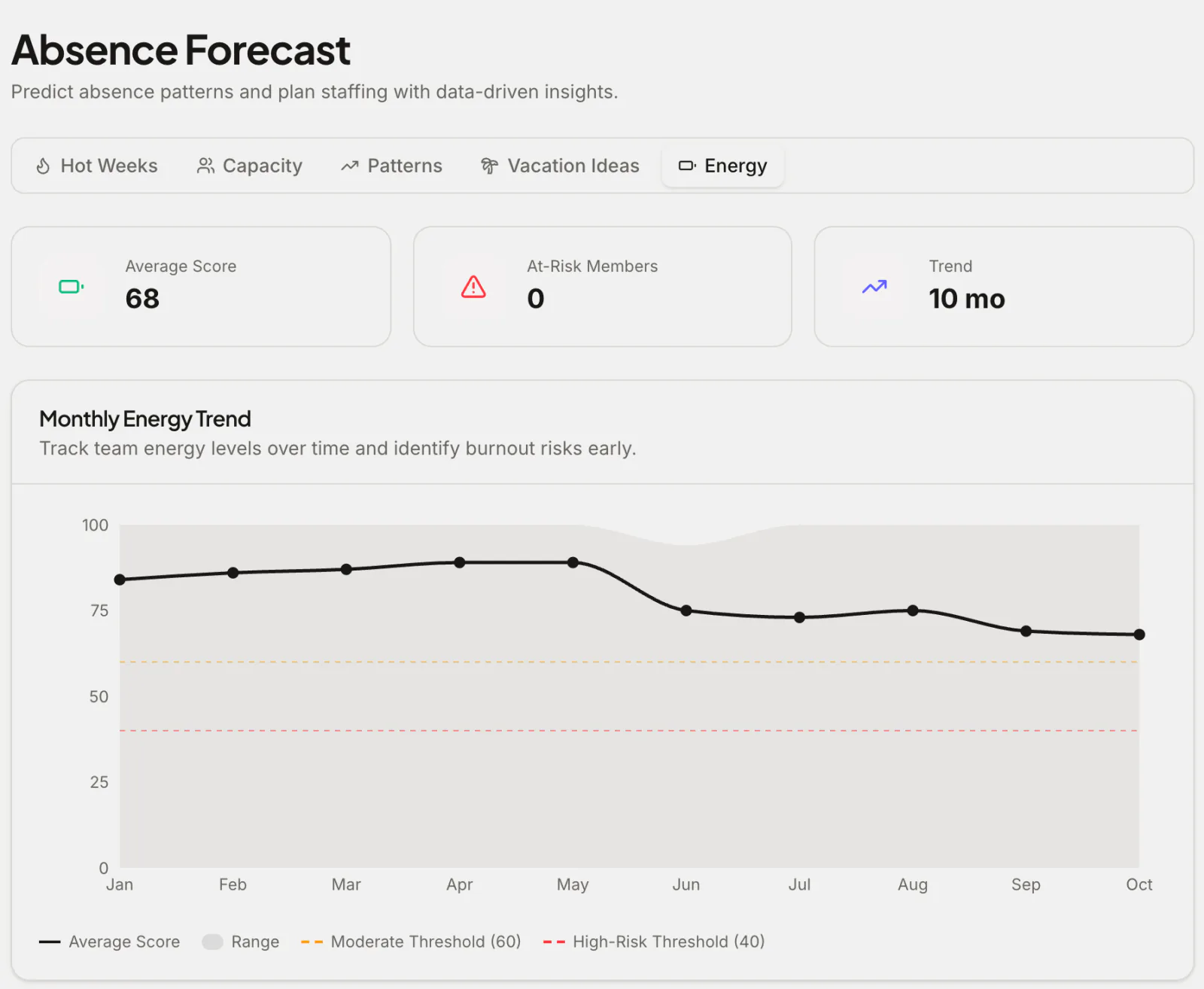
Higher is better. The trend chart marks a moderate threshold at 60 and a high-risk threshold at 40: a team or person below 40 is probably running on empty.
Where you see it
The Energy tab in Forecasts shows the monthly trend for the team, with the moderate (60) and high-risk (40) thresholds marked, and a breakdown of which factors are pulling the score down.
On the dashboard, a Team Energy card shows the current score with its trend since the start of the year, and the score for each department.
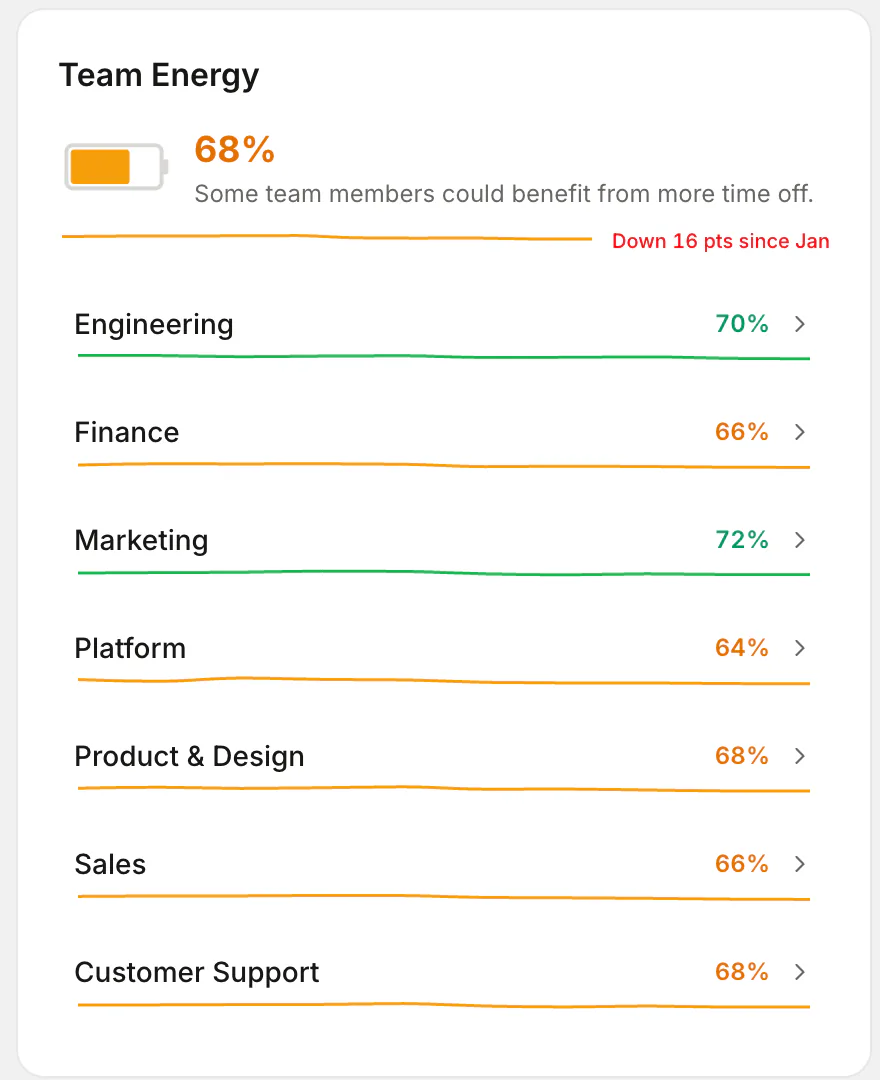
That department view is often the most useful. If one team sits ten points below the rest, it's rarely ten individual problems. It's usually workload, a gap in cover, or a manager who never takes leave and so nobody else feels they can.
What to do with a low score
The score is a reason to start a conversation, not to send an automated nudge and move on.
- Check in, privately. "You haven't had a break since spring. Is there something stopping you?" often gets a surprisingly honest answer.
- Remove the blocker. If people don't take leave because nobody can cover them, that's a staffing problem. The forecast's Capacity tab shows where cover is thin.
- Model it. Managers who take their own leave, visibly, give their teams permission to do the same.
- Suggest good dates. The Vacation Ideas tab in Forecasts finds public holidays where a day or two of leave becomes a long weekend.
- Watch the trend. A score that's sliding month after month matters more than any single reading.
Recharge types: the personal side
Alongside the computed score, Pro includes an optional recharge quiz on the dashboard: five quick questions, about 30 seconds, that tell someone whether they recharge best as an Explorer, a Homebody, a Social type or a Creator.
When someone hasn't taken leave for 60 days or more, the dashboard nudges them with a suggestion that fits their type, like planning a trip for an Explorer. Managers see how their team splits across the four types, which is a nice way to make "take a break" feel personal rather than an HR reminder.
Why this matters more than it sounds
Presenteeism (working while exhausted or unwell) costs teams more than absence does, because it's invisible. We covered the numbers in the cost of working while sick. An energy score doesn't fix that on its own, but it makes the invisible visible, early enough to do something about it.
It works especially well with unlimited or wellbeing leave, where the risk is precisely that people take less time off than they should.
Frequently asked questions
Which plan includes the energy score? Pro ($37.50 a month for up to 50 people) and the Custom Pack. The recharge quiz is part of Pro too.
Does anyone fill anything in? Not for the score: it's calculated from leave records, not from surveys or messages. Only the recharge quiz asks questions, and it's optional.
Who sees the Energy tab? Admins and location-admins, in Forecasts, for the office they have selected.