
7 Signs Your Team Has Outgrown a Free Leave Tracker
A free leave tracker is the right start for a small team. Here are the seven signs it's time to move up, from a second office to Slack approvals, and what each one costs you if you wait.
Starting on a free leave tracker is the right call for a small team. You get requests, approvals, balances and a shared calendar without a budget conversation, and for a while that's all you need.
Then the company grows, and the free plan starts asking you to work around it. Nobody announces the moment you've outgrown it; it shows up as small frictions that add up. Here are the seven signs we see most often, and what each one is quietly costing you.
1. You're about to hire person number eleven
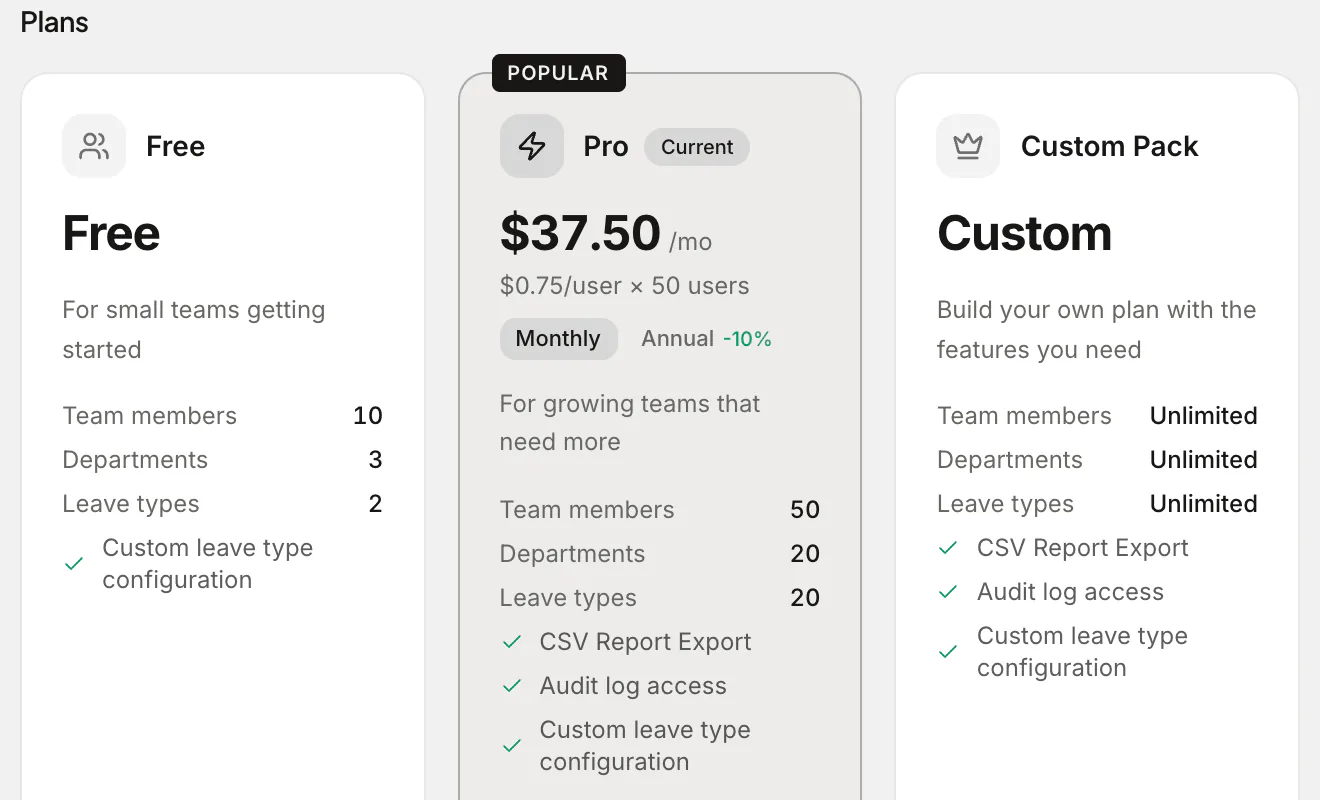
Absenca's free plan covers up to 10 people. That's a deliberate line: a team of ten can run on goodwill and a shared calendar, but the eleventh hire usually means a second manager, a second department, or both.
When you cross it, Pro covers up to 50 people for $37.50 a month, or $33.75 a month billed annually ($405 a year). Pro bills 50 seats at $0.75 a month each whatever your headcount, so the bill doesn't creep up with every new starter between 11 and 50.
2. "Vacation" and "sick" aren't enough leave types any more
The free plan allows two leave types, which fits the classic annual-leave-plus-sick setup. Growing teams need more: parental leave, unpaid leave, personal days, a wellbeing day, time off in lieu. Lumping them together breaks your balances, because sick days end up eating into holiday allowance and nobody trusts the numbers.
Pro raises the limit to 20 leave types, each with its own allowance, accrual, carry-over rules and approval behaviour.
3. You've opened (or are opening) a second office
Every office in Absenca is its own unit: its own work week, time zone, public holidays, leave year and leave types. The free plan has one office. The moment you hire in a second country, or a second city with different holidays, you need the second office so that a bank holiday in Zurich doesn't get deducted from someone in Berlin.
Pro includes two offices. If you need more, you can configure a Custom Pack and see its price in the app before paying. There's more on this in managing leave across two offices.
4. Managers want to approve leave without opening another tab
If your team lives in Slack, every request that waits for someone to log in to a web app is a request that waits too long. On Pro, Absenca's Slack bot sends the request to the right approver with Approve and Reject buttons, tells the employee the decision in a DM, and lets anyone check their balance with /absenca balance.
5. Someone asked "who changed my balance?"
Once more than one person can approve leave or adjust balances, you'll eventually need to answer "who did this, and when?" The Pro audit log records leave decisions, cancellations, balance adjustments, role changes and settings changes, and keeps them for a year. Without it, the answer is someone's memory.
6. You keep getting surprised by busy weeks
Small teams feel every absence. If the same weeks catch you short every year (the February half-term week, the last fortnight of December), you're paying for it in overtime and cancelled plans. Pro's absence forecast shows your historically busiest weeks and flags departments at risk of dropping below cover in the next 30, 60 or 90 days.
7. HR is rebuilding the same report every month
If someone exports a CSV every month to send balances to payroll, or writes a Monday "who's out this week" email by hand, that's an hour a week of copy-paste. Pro schedules both as emails: a weekly summary on the day you pick, and a monthly balance report on the 1st.
What stays the same when you move up
Upgrading doesn't mean migrating. Your people, balances, history and settings stay exactly where they are; Pro switches on the extra limits and features on the same account. You upgrade from Settings → Plan & Billing, pick monthly or annual, and you're done. The pricing page lists what each plan includes.
A quick self-check
Count how many of these are true for you today:
- More than 10 people, or about to be
- More than two kinds of leave you need to track separately
- A second office or country
- A team that runs on Slack
- More than one person approving or adjusting leave
- Busy weeks that keep catching you out
- A report someone builds by hand every month
One or two, and the free plan may still be the right fit for a while. Three or more, and you're spending time working around a limit that costs $37.50 a month to remove.
Frequently asked questions
Is the free plan a trial? No. Absenca's free plan has no end date and doesn't need a credit card. You can stay on it as long as it fits.
Do I lose anything if I upgrade and later go back to free? No data is deleted. If you cancel, Pro runs to the end of the period you paid for, then the account moves to the free plan. The free limits only stop you creating new things above them.
What if we're bigger than 50 people? Configure a Custom Pack in the app: set your headcount and the features you need, and you see the price before you pay.